Your data can't leak
if nobody else can read it.
uOS encrypts your chats, files, notes, documents, calls and plans on your device with post-quantum algorithms before they leave it. A hacked server, a curious provider or a stolen database exposes only scrambled data. More than twenty apps for families, teams and whole organizations, in one private workspace in your browser.
What our servers can still see: who is in which space, when something is sent and how large it is. Details
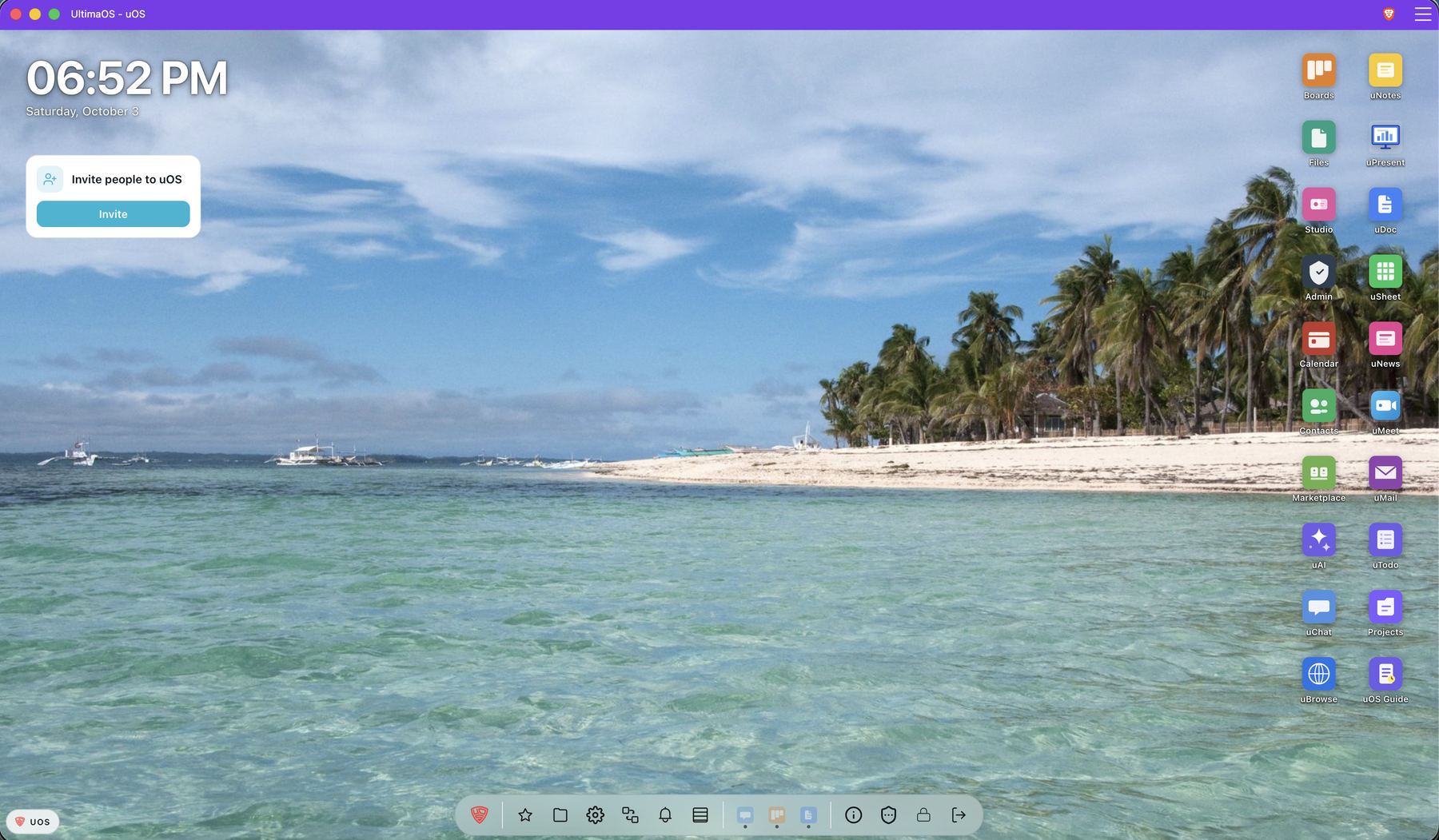
The real uOS desktop. Wallpaper: Malapascua, Philippines, by Vyacheslav Argenberg, CC BY 4.0.
What uOS is
A private workspace that runs in your browser. One sign-in, every app, on any device.
Apps in windows
On a computer, apps open in windows on a desktop. On a phone, they open full screen from a home screen. Nothing to install.
Spaces for every part of life
A platform is a separate space with its own people and content: your family, your club, your company. You switch between them in one click.
Locked before it leaves
Your device encrypts messages, files and documents. Our server stores and forwards them, but it has no key to open them.
A whole suite of apps. And it keeps growing.
Platforms
One account. Separate worlds. A platform for each part of your life.
A platform is a separate workspace inside uOS: your family, a club, a company, a project group, or the shared uOS workspace everyone belongs to. Each platform has its own members, roles, settings and content.
- Your role
- Owner
- Shown as
- Mum
- Members
- 6
- Apps
- uChat, Calendar, Files
The same account on all three, with a different role and name on each.
Content stays where it was made
Chats, files, boards, documents, calendar and mail stay on the platform where they were created.
One account, many platforms
Your identity stays the same everywhere. Switching changes windows, desktop icons, wallpaper, theme and notifications, and new content always lands on the platform you are in. You can show a different name on each platform.
Create one, or ask to join
Anyone can create a platform and becomes its first owner. Open platforms are listed under "Discover open platforms": you ask to join, and the platform decides. Everyone else joins by invitation.
One role per platform
Every member has one role on each platform: Owner, Superuser, Admin, HR, Moderator, Member or Guest. A rights matrix decides what each role may do, from managing people to apps and security. Every member can see the member list.
Owners set the rules
Which apps are enabled, the security policy (for example a required uID security key, or how browsers may remember people), AI on or off and which provider, emergency access for organizations, and the branding. Every administrative change is written to the audit log.
Leaving closes the door
When someone leaves a platform, they lose access, and the encrypted items they could open get new keys.
Find open platforms and ask to join
Owners choose whether a platform is Open or Closed. Closed platforms are invisible to outsiders and can only be joined by invitation. Open platforms can be found by every signed-in uOS user.
- Search by name in the Platform Switcher, or under Settings → Platform → "Discover open platforms".
- Each result shows only the name, description and logo, nothing about members or content.
- "Ask to join" sends a request. You can withdraw it, and have up to 20 open requests at a time.
- The people who may manage the platform approve or decline. You get a notice, then switch to it with the platform pill.
Weekend rides, repair evenings and the summer city tour.
Samir searches "cycling", asks to join his city's cycling club, and the next evening he is a member.
From a household to a region
Each of these is its own platform, with its own members, roles and rules. One person can belong to many of them, and switching takes one click.
- HouseholdA family at home
- Friends and clubsThe football team, the book club
- School or companyA school with its classes, a firm with its teams
- MunicipalityThe town hall and its servicesuGov Planned
- RegionA regional authority and its partnersuGov Planned
Linking platforms into a hierarchy, for example a region with its municipalities. Planned
AI, your choice
AI is a helper here, not the point. Use it, or never see it.
Off unless you say yes
When you first sign in, AI is a separate, optional choice. Without your yes, nothing you write goes to an AI. You can change your mind any time in Settings.
Your platform decides too
Owners can switch AI off for the whole platform, or choose the provider for everyone and lock it, for example the one the company has a contract with.
Any provider, including your own
Pick a cloud provider, or run a model on your own machine with Ollama. Then your prompts never reach an AI company.
Tools only when you allow them
AI can act in your apps only with the tools you switch on. Commands on your computer always wait for your approval.
Plainly: when you use AI, your prompt goes to the provider you chose, through our server. Your saved conversations are encrypted with your own key.
Post-quantum
Post-quantum protection in every app.
Encrypted by you, on your device, not by us.
What stays readable so the service can work: calendar times, task due dates and priorities, public boards, and what you send to an AI provider. How it works
Self-hosting
Run uOS on your own servers. With a self-hosting licence.
Some organisations must keep everything in their own data centre. With a self-hosting licence from UltimaOS you run the same uOS on your own infrastructure: the same apps, the same client and the same encryption, operated by you.
Your infrastructure
Your servers, your network, your country. You operate the server, and the end-to-end encryption protects your users against the operator in the same way as on uos.sh.
The same signed releases
Every release comes with a signed manifest of its files, so you can check that what you deploy is exactly what we published, and your users can check what their browser receives.
The strongest suite, and CNSA 2.0 next
ML-KEM-1024 and ML-DSA-87 already protect uos.sh, paired with X25519 and Ed25519. For installations that must meet CNSA 2.0, a suite with ML-KEM-1024, ML-DSA-87 and AES-256-GCM is built into uOS and tested; running it on a dedicated installation is the next step.
Licensed per seat
Licences are per seat, with terms for non-profits and education. Updates and support are part of the licence.
Source code
Check it yourself. Open source follows with the Beta.
Request GitHub access
Tell us who you are and what you would like to review. We reply to every request.
Where we are
uOS is in alpha. Real people use it every day.
Why we are here
Most services can read what you write. We built one that can't.
No reading, no profiling
There are no ads and no tracking in uOS. The server cannot read your content, so it cannot sell, scan or train on it.
Ready for quantum computers
Data recorded today could be decrypted by quantum computers later. uOS pairs proven encryption with new post-quantum algorithms, so both would have to break.
One place instead of ten
Family chat in one app, shopping list in another, work in a third. uOS keeps them together, with one identity and one security model.
FAQ
Frequently asked questions
Is uOS an alternative to Google Workspace?
Yes. uOS is a private, end-to-end encrypted alternative to Google Workspace and Microsoft 365: chat, mail, calls, documents, spreadsheets, calendar, tasks, boards and AI, on one identity. Unlike them, the server cannot read your content.
Where is my data stored, and who owns the infrastructure?
Your data is hosted in Switzerland, under Swiss law, with no US entity — so it sits outside the US CLOUD Act. That is what makes uOS a sovereign cloud: the content is encrypted by you, and the jurisdiction protects the rest.
Can uOS read my messages and files?
No. Messages, mail, files, documents and notes are encrypted on your device before they are sent. Our servers only store unreadable data. Where something is not end-to-end encrypted, we say so explicitly.
Is uOS free?
Yes. uOS is free forever for personal use. Businesses and institutions pay per seat, and organisations can self-host under licence. uOS is currently in alpha, by invitation — request one at uos.sh.